What a noindex Tag Really Does
A stray noindex removes a page from Google entirely, and nothing on the page looks wrong. Here is where it hides and how to check.

A noindex tag tells search engines to leave a page out of their results entirely. Used deliberately it is useful. Left on a page by accident, it is the single most damaging thing in technical SEO: the page disappears from Google completely, and nothing about the page itself looks wrong.
That combination — total effect, invisible cause — is why a stray noindex can go unnoticed for months while someone rewrites titles wondering why nothing helps.
What does noindex actually do?
It removes the page from the index. Not lowers it — removes it. The page can still be crawled, still be linked, still load perfectly for visitors, and still be completely absent from every search result.
This is different from robots.txt, which blocks crawling. A page blocked in robots.txt can still appear in results (Google knows it exists from links, it just cannot read it). A noindexed page is genuinely gone.
Where does a noindex hide?
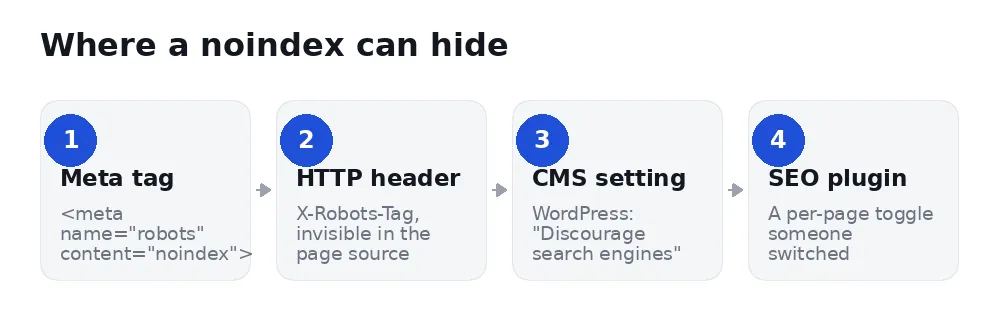
In the page's HTML, as <meta name="robots" content="noindex">. This one you can see by viewing the source and searching for "noindex".
In an HTTP header, as X-Robots-Tag: noindex. This one is invisible in the page source — you have to inspect the response headers. Plenty of audits miss it entirely, which is why a page can look clean and still be excluded.
In a CMS setting. WordPress has a checkbox under Settings → Reading labelled "Discourage search engines from indexing this site". It is meant for sites under construction. It gets switched on before launch and forgotten after.
In an SEO plugin. Yoast, Rank Math and the rest all offer a per-page index toggle. One misclick on a template applies it to a whole post type.
How do you check?
Three ways, in order of certainty:
- Google Search Console → URL Inspection. Paste the URL. If it says "Excluded by 'noindex' tag", you have your answer, from the only source that counts.
- View source (Ctrl+U) and search for
noindex. Catches the meta tag, not the header. - Search
site:yoursite.com/your-pagein Google. No result is a strong hint, though a brand-new page may simply not be crawled yet.
The Coverage report in Search Console will also list every excluded page in one place — worth reading through once a quarter, because it is where an accidental noindex shows up without you having to suspect it first.
When should you use noindex on purpose?
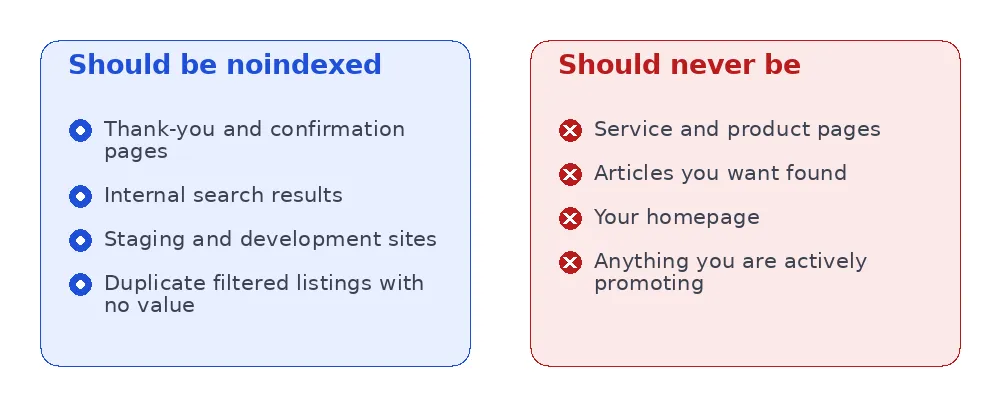
Legitimate uses are narrower than people think. Thank-you pages that should not be found without converting. Internal search result pages, which create endless low-value URLs. Staging sites. Filtered listings that duplicate a main category with no added value.
Everything you actually want customers to find should be indexable — which is most of your site.
How do you remove it in WordPress?
Three places to check, in this order, because each can override your assumption about the others:
1. Settings → Reading. Uncheck "Discourage search engines from indexing this site". This is the site-wide switch and by far the most common cause. If it is on, nothing else you do matters.
2. Your SEO plugin, per page. In Yoast, open the page, scroll to the SEO box, then Advanced → "Allow search engines to show this page?" must be Yes or Default. Rank Math has the same control under Advanced → Robots Meta.
3. Your SEO plugin, per post type. This is the one that catches people. A single setting can noindex every page of a type at once — all your tags, all your products, all your case studies. In Yoast it is under Settings → Content Types; in Rank Math under Titles & Meta. If a whole section of your site vanished rather than one page, look here first.
After removing it, verify rather than assume: run the URL through Search Console's URL Inspection again and confirm it no longer says excluded, then click Request Indexing.
noindex, robots.txt or canonical?
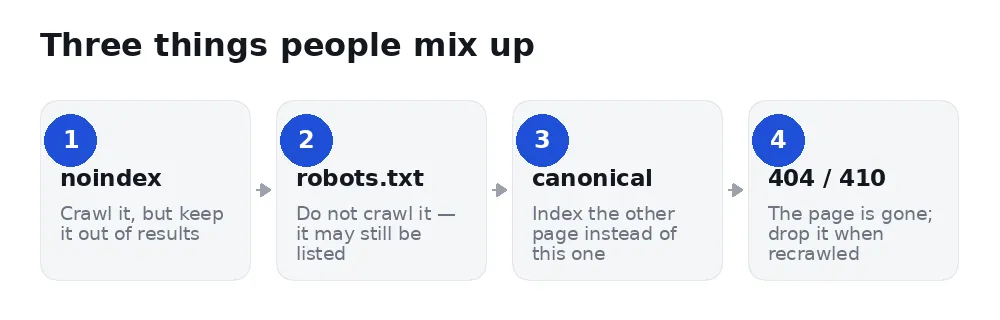
These four get used interchangeably and do quite different jobs.
A common and costly mistake is combining the first two: blocking a page in robots.txt and adding a noindex tag. Because robots.txt stops the crawl, Google never reads the noindex — so the page can linger in results for months, showing a bare URL with no description. If you want a page out, allow the crawl and let it see the noindex.
What is the difference between noindex and nofollow?
They are often written together and do different jobs.
- noindex — do not include this page in results.
- nofollow — do not pass ranking value through the links on this page.
You rarely want nofollow at page level. If a page is noindexed but you still want its links to flow (a thank-you page linking to your services, for example), leave it as noindex, follow.
How long until a page comes back?
Once you remove the tag, the page has to be recrawled before it can return. Days to weeks naturally; faster if you request indexing through URL Inspection in Search Console.
It usually returns to roughly where it was, assuming nothing else changed. A long absence can cost you ground, which is the real argument for checking rather than hoping.
FAQ
Does noindex hurt the rest of my site?
No. It affects only the page carrying it. It does not spread.
Can I noindex a page and still have it rank?
No — those are contradictory instructions. If you want a page to rank, it must be indexable.
Should I noindex tag and category archives?
It depends on whether they are useful. A well-curated category page can rank on its own; an auto-generated tag archive with three posts usually adds nothing. Judge them individually.
My page vanished but has no noindex. What else could it be?
A canonical pointing elsewhere, a robots.txt block, a manual action, or simply a page too new to be crawled. Search Console's URL Inspection distinguishes them.
Does noindex stop people reaching the page?
No. Anyone with the link can open it, and it is not private in any sense. If a page must not be seen, it needs a password, not a noindex.
Is noindex bad for crawl budget?
Marginally, since the page still gets crawled. For sites under a few thousand pages this is not worth thinking about — crawl budget is a large-site concern.
How do you stop it happening again?
Two habits prevent nearly every accidental case.
Make it part of going live. The single most common cause is a staging setting that survived launch. Put "uncheck Discourage search engines" on your launch checklist, next to changing the placeholder phone number, and it stops being an annual surprise.
Watch the Coverage report. In Search Console, the Pages report lists everything excluded and why. Reading it once a quarter takes five minutes and catches an accidental noindex weeks before you would notice the traffic loss — which matters, because the traffic does not come back the moment you fix it. It comes back when the page is recrawled and has climbed again.
If you run several sites, this is exactly the kind of check worth automating, because it is invisible until it is expensive.
Check every page at once
SerpCue's on-page audit reads both the meta tag and the X-Robots-Tag header on every page it crawls, and reports an accidental noindex as a critical issue — because everything else in an audit is meaningless on a page Google cannot show. You can also check a single page free, without an account.


