Alt Text for Images: A Practical SEO Guide
A practical guide to writing alt text for images that supports accessibility, image SEO, and cleaner on-page optimization.

Alt text for images is the short written description that tells screen readers and search engines what an image means on a page. Good alt text helps people who cannot see the image, gives Google useful image context, and keeps your on-page SEO cleaner. The best alt text is specific, useful, and tied to the purpose of the image, not stuffed with keywords.
If you own a website and do SEO yourself, you do not need to overthink every image. You need a repeatable rule: describe important images clearly, leave decorative images empty when appropriate, and make sure your most important pages do not have missing or misleading image alt attributes. This guide shows you how to write alt text, when to skip it, how to handle product and blog images, and how to audit your site without turning image SEO into a huge project.
What is alt text?
Alt text, short for alternative text, is the value inside an image’s alt attribute. In HTML it looks like this:
<img src="running-shoes.jpg" alt="blue trail running shoes on a rocky path">The alt attribute gives a text alternative when the image cannot be seen. A screen reader can read it aloud. A browser can show it if the image fails to load. Search engines can use it as one signal to understand the image and the page around it.
Alt text is not the same as a caption. A caption is visible on the page for all readers. Alt text is usually not visible, but it is still part of the page’s HTML. It should describe the image only as much as a visitor needs in that specific context.

The key word is alternative. If the image disappeared, what information would the visitor lose? That answer usually tells you what the alt text should say.
Why does alt text matter for SEO and accessibility?
Alt text matters first because it makes your site more usable. Visitors who use screen readers should not lose important information just because it was presented as an image. A useful product photo, chart, diagram, screenshot, or instructional image should have a text alternative that explains its role.
It also matters for SEO. Google cannot understand images the same way a person does, so it looks at signals around the image: filename, surrounding text, caption, structured data, page topic, and alt text. Good alt text can help image search visibility and support the relevance of the page when the image is genuinely related to the topic.
That does not mean every image needs a keyword. Bad alt text often comes from treating the field as a keyword box. If a page is about kitchen remodeling and every image says “kitchen remodeling contractor kitchen remodeling services best kitchen remodeling,” you are not helping users or search engines. You are creating noise.
The better approach is simple: write alt text that a real person would find useful if the image were unavailable. If the primary keyword fits naturally, use it. If it does not, do not force it.
How do you write good alt text for images?
Good alt text is short, specific, and contextual. It names what matters in the image and ignores what does not. Most website images can be described in one clear phrase or sentence.
Use this checklist:
- Describe the useful information, not every visual detail. “Woman comparing two running shoes in a store” is usually enough; you do not need to describe the floor, wall color, and lighting unless they matter.
- Match the page context. The same image may need different alt text on different pages if it supports a different point.
- Be concise. Many good alt attributes are under 125 characters, but clarity matters more than a strict number.
- Avoid “image of” or “picture of.” Screen readers already announce images in many contexts.
- Use keywords only when natural. If the image is genuinely about the target topic, the keyword may fit. If not, skip it.

For example, imagine a blog post about fixing broken links. A generic alt text like “dashboard” is weak. A stuffed version like “SEO audit tool broken links checker broken links SEO” is worse. A useful version is “SEO audit dashboard showing broken internal links to fix.” It tells the reader what the image contributes, and it includes the topic naturally.
If you are also working on snippets and on-page copy, treat alt text with the same discipline you use for titles and descriptions. It should be accurate, helpful, and not manipulative. The same principle applies when you write a meta description: clarity beats keyword stuffing.
When should alt text be empty?
Not every image needs descriptive alt text. Decorative images should usually use an empty alt attribute: alt="". Empty alt text tells assistive technology to skip the image instead of reading a useless filename.
Examples of images that may be decorative include background patterns, divider graphics, abstract shapes, generic hero accents, or icons that repeat nearby text. If an icon appears next to the visible word “Email,” the alt text does not need to say “email icon.” The visible label already communicates the action.
Do not confuse empty alt text with missing alt text. Empty alt text is intentional. Missing alt text usually means nobody made a decision. For accessibility and audit purposes, that difference matters.
A practical question helps: if this image disappeared, would the page lose meaning? If yes, write alt text. If no, use empty alt text and let readers move on.
Alt text examples by image type
The easiest way to learn alt text is by page type. Here are common examples site owners can adapt.
Blog image
Weak: “SEO image.”
Better: “SEO audit checklist showing title tags, meta descriptions, and image alt text.”
The better version says what the image shows and why it is relevant to the article.
Product image
Weak: “Backpack.”
Better: “Black waterproof hiking backpack with front zipper pocket.”
For ecommerce, include details a buyer would care about: product type, color, material, model, or visible feature. Do not repeat the full product title if it is already nearby unless that is the clearest description.
Service page photo
Weak: “Team.”
Better: “HVAC technician inspecting an outdoor air conditioning unit.”
This gives useful service context without trying to rank for every local keyword.
Chart or diagram
Weak: “Chart.”
Better: “Chart showing organic traffic increasing after technical SEO fixes.”
If the chart contains important data, consider summarizing the key takeaway in the surrounding text too. Alt text alone is often not enough for complex charts.
Linked image or button
If an image is a link or button, the alt text should describe the action, not the image. “Download SEO checklist” is better than “PDF icon.”
How do you audit missing alt text?
For one page, you can inspect the HTML and search for <img. Look for images with no alt attribute, meaningless filenames, or repeated generic descriptions. For a whole website, use a crawler or audit tool so you can review pages in batches.
Prioritize in this order:
- Important pages first: homepage, service pages, product pages, category pages, and high-traffic blog posts.
- Images that explain something: diagrams, screenshots, charts, process visuals, and product photos.
- Images linked to actions: buttons, banners, linked logos, and clickable graphics.
- Pages that already rank or get impressions: small improvements matter more when the page is already being seen.
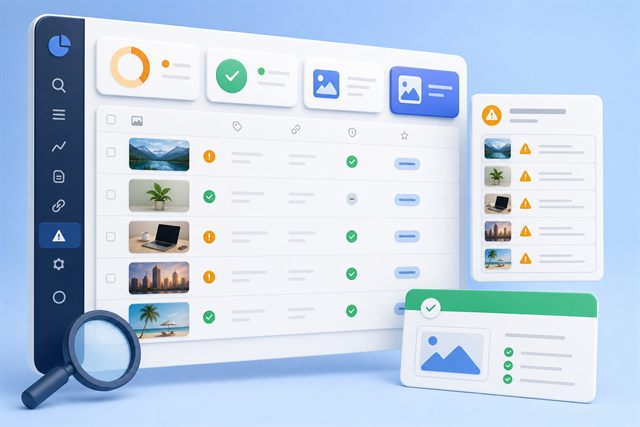
SerpCue’s SEO audit tool helps surface on-page issues like missing image alt text, weak titles, meta descriptions, broken links, and other fixes that site owners can act on without digging through every page manually.
Alt text is also a good companion task when you are cleaning up technical issues. If an audit finds broken images or broken internal links, fix those first. A page with perfectly written alt text still creates a poor experience if key assets do not load or links lead nowhere. This is why a broken-link pass, like the process in our guide to finding and fixing broken links, often belongs in the same cleanup session.
How should WordPress and product images use alt text?
In WordPress, you can usually edit alt text in the Media Library or directly inside the block editor. The important part is not where you type it, but whether the text matches how the image is used on the page.
For blog posts, write alt text after the article is drafted, not before. That way you know what role each image plays. A screenshot used to show a settings panel needs different alt text from a screenshot used to show an error message.
For product images, make the first product image especially clear. Include the product type and visible distinguishing details. For secondary images, describe what changes: back view, close-up of material, packaging, dimensions, or product in use.
For local service businesses, avoid stuffing city names into every image. If the image genuinely shows your team working in Toronto or Austin, mention it naturally. If it is a generic stock photo, forcing a city into the alt text is not useful.

If you use WordPress heavily, pair this workflow with a broader on-page review. Our WordPress SEO tool page explains how SerpCue helps turn WordPress SEO checks into prioritized tasks instead of a long, fuzzy checklist.
Common alt text mistakes to avoid
Most alt text mistakes come from either ignoring the field or overusing it. Both create problems.
- Leaving important images missing alt text. This hurts accessibility and removes useful image context.
- Using filenames as alt text. “IMG_4821.jpg” is not a description.
- Repeating the same alt text on every image. Each meaningful image should describe its own purpose.
- Stuffing keywords. This makes the page worse for users and does not create quality SEO.
- Describing decorative images. Decorative images should usually be skipped with empty alt text.
- Forgetting linked images. If the image is clickable, describe the destination or action.
A strong alt text habit is small, but it compounds. Every important image becomes easier to understand, easier to audit, and better aligned with the page’s real purpose.
FAQ
Is alt text a ranking factor?
Alt text is one signal Google can use to understand images and the page around them. It is not a magic ranking lever, but useful alt text supports image SEO, accessibility, and on-page clarity.
How long should alt text be?
Most alt text should be concise, often one phrase or sentence. A common practical target is under about 125 characters, but the real goal is to describe the useful information clearly.
Should I put keywords in every image alt text?
No. Use a keyword only when it naturally describes the image and fits the page context. Repeating keywords across every image is spammy and not helpful.
What is the difference between missing alt text and empty alt text?
Missing alt text usually means no decision was made. Empty alt text, written as alt="", is intentional and tells assistive technology to skip decorative images.
Next step
Start with your ten most important pages and review only the meaningful images. Add clear alt text where the image explains, sells, compares, or links somewhere. Leave decorative images empty. If you want a faster way to find missing alt text across your site, run a SerpCue SEO audit and use the image issues as your first cleanup list.


