Keyword Cannibalization Explained
When two of your pages compete for one query, both rank worse. Here is how to tell real cannibalization from pages that merely share words.

Keyword cannibalization happens when two or more pages on your site compete for the same search query, so Google has to choose between them. It usually shows up as two pages that both rank mediocrely for a term where one page could have ranked well.
It is also one of the most over-diagnosed problems in SEO. Plenty of pages share words without competing at all, and "fixing" those makes a site worse. This guide covers how to tell the difference, and what to actually do when it is real.
What is keyword cannibalization, exactly?
The name suggests pages eating each other, which overstates it. What really happens is that your ranking signals — links, relevance, engagement — get split across two URLs instead of concentrating on one. Google then picks whichever it judges better for each search, and often changes its mind.
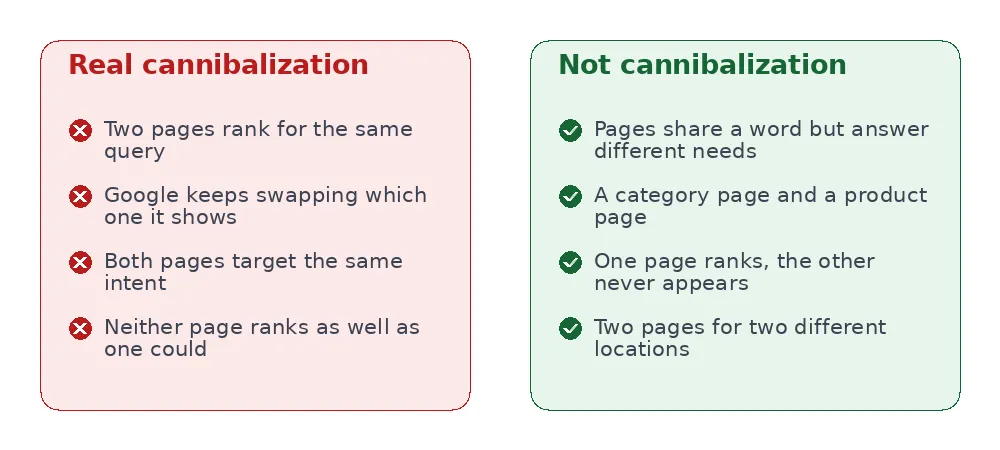
The distinction that matters is intent, not vocabulary. A page called "running shoes for flat feet" and one called "best running shoes 2026" share words but answer different questions. Two pages both explaining what a canonical tag does are competing, whatever they are called.
Is it actually hurting you?
Often less than people assume. Google is good at picking a page. The cost is real but modest: you rank a bit lower than a single consolidated page would, and your reporting gets muddier.
It becomes a genuine problem when:
- Google keeps swapping which page it shows. That instability usually means neither page is clearly the best answer.
- Both pages are stuck in positions 5–20. Combined, they might have had the authority for the top three.
- The wrong page ranks — a blog post outranking the service page you actually want people to land on.
How do you find it?
Google Search Console again, and this is the only reliable method — guessing from titles produces false positives.
- Open Performance → Search results.
- Filter to a specific query using + New → Query.
- Switch to the Pages tab.
- If two or more of your URLs show meaningful impressions for that one query, you have a candidate.
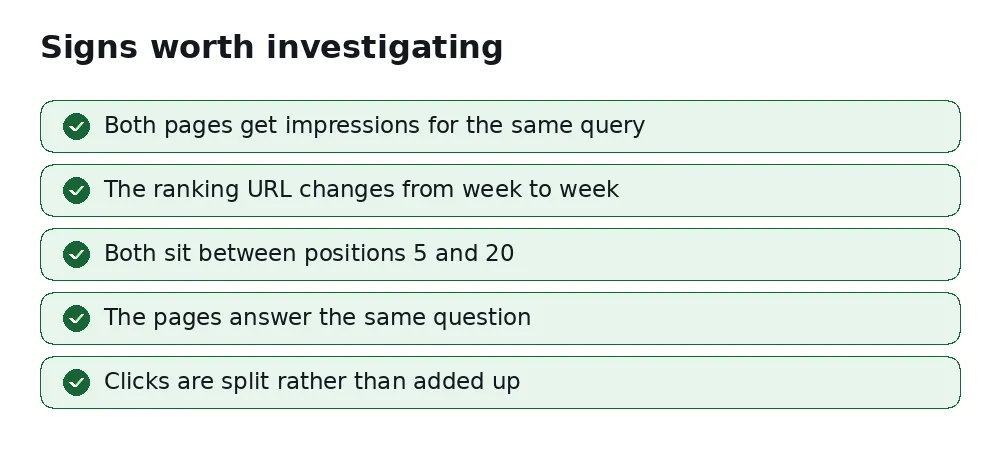
Note the word candidate. Two URLs appearing for one query is normal when one is a category and the other a specific article. Before acting, open both pages and ask honestly: would a searcher be satisfied by either? If yes, they compete. If each suits a different person, leave them alone.
How do you fix it?
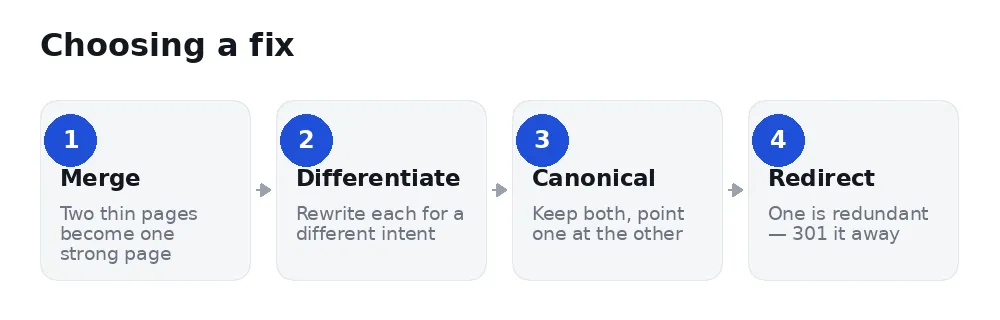
Merge when both pages are partial. Take the best of each into one comprehensive page, then 301 the weaker URL to the survivor. This is the most common right answer and usually the most effective.
Differentiate when both topics deserve a page but you wrote them too similarly. Rewrite each around a distinct question, give them distinct titles, and link them to each other. This keeps two assets instead of one.
Canonical when you need both URLs to exist for users — a printer-friendly version, a near-duplicate landing page — but only one should be indexed. See our guide to canonical tags.
Redirect when one page is simply redundant and nothing on it is worth keeping.
Which page should you keep?
When you merge, the instinct is to keep the newer or the better-written one. Usually that is wrong. Keep the page with the most history — the one with backlinks, age, and existing rankings — and move the better content onto it.
Judge in this order:
- Which URL has external links? Those are the hardest thing to replace. Check with any backlink tool, or simply search for the URL.
- Which ranks higher today? Google has already told you which it trusts.
- Which URL makes more sense long term? A clean, descriptive path you will not want to change again.
Then move the best sections from the loser into the winner, 301 the loser, and update any internal links that pointed at the old URL so visitors are not bounced through a redirect unnecessarily.
A worked example
A plumbing company has two pages: "Boiler repair" (a service page from 2021) and "How much does boiler repair cost?" (a blog post from 2024).
In Search Console, filtering to the query boiler repair cost, both pages show impressions. The blog post ranks 8th some weeks, the service page 11th others. Neither has ever cracked the top five.
Is this cannibalization? Look at intent. Someone searching "boiler repair cost" wants a number. The service page sells the service and mentions price vaguely; the blog post answers with a range but does not let anyone book.
The right fix here is differentiate, not merge: put the actual price range and a booking button on the service page, and rewrite the blog post to go deeper on what changes the price — boiler age, parts, emergency call-out. Two pages, two jobs, and each one now clearly better at its job than the muddle they were before.
Had both pages simply been vague guides with no booking path, merging would have been correct. The decision comes from reading them, not from the tool's flag.
What should you not do?
Do not noindex the loser. It is a tempting shortcut and a bad trade: you throw away whatever links and authority that URL had, instead of passing them to the page you kept. A 301 redirect keeps the value. (And a stray noindex has a way of outliving its reason — see what a noindex tag really does.)
Do not merge pages that serve different intents just because a tool flagged them. You will end up with one page that half-answers two questions.
Do not chase every flag. Cannibalization tools are pattern matchers. The decision needs a human who knows what the pages are for.
How do you prevent it?
Before writing anything new, search your own site: site:yoursite.com your topic. If a page already covers the ground, improving it usually beats adding a second one.
Keep a simple list of which page owns which topic. On a site with more than about thirty pages this is the difference between a content plan and a pile of articles.
FAQ
Can two pages from my site rank for the same query legitimately?
Yes. Google sometimes shows two results from one domain, particularly for branded searches. That is not cannibalization — that is two useful pages.
Does cannibalization cause a penalty?
No. There is no penalty. It is a self-inflicted efficiency problem, not a violation.
How long after merging before things improve?
Typically a few weeks, once the redirect is processed and the surviving page is recrawled.
What about pages targeting different cities?
Genuinely different locations, with genuinely different content, are not cannibalization. Near-identical pages with the city name swapped are a different and older problem — thin doorway pages.
Will merging lose the traffic the second page had?
Not if you 301 redirect it. The redirect passes the great majority of the value to the surviving page. Deleting without redirecting is what loses traffic.
How many pages is too many on one topic?
There is no number. One page per question people actually ask is the right shape. Three pages answering the same question is one page and two mistakes.
Do I need a tool for this?
No. Search Console's query filter is enough, and for a site under fifty pages you may find every case in an hour. Tools help when you have hundreds of pages and no idea where to start.
Check your own site
SerpCue's Cannibalization screen reads your Search Console data and lists queries where more than one of your pages picks up meaningful impressions, so you can judge the real cases quickly. When there is not enough query data to draw a conclusion, it tells you that instead of showing an all-clear it cannot support.


