Orphan Pages SEO: How to Find and Fix Hidden Pages
A practical guide to orphan pages SEO: how to find hidden pages, decide what to keep, and reconnect useful URLs with internal links.

Orphan pages SEO means finding useful pages that search engines and visitors can technically access, but that your own site does not point to with normal internal links. The fix is not to link to every hidden URL at random. First decide whether the page still has a job, then reconnect important pages from relevant hubs, merge weak duplicates, redirect dead weight, and keep a repeatable check in your monthly SEO routine.
For a site owner doing SEO yourself, orphan pages are one of the most practical technical problems to fix because they sit between content, crawlability, and internal linking. You may already have good pages, but if they are cut off from the rest of the site, Google gets fewer signals about where they belong and visitors rarely discover them.
Table of contents
- What are orphan pages?
- Why do orphan pages hurt SEO?
- How do you find orphan pages?
- Which orphan pages should you fix first?
- How do you fix orphan pages SEO?
- How do you prevent orphan pages from coming back?
- FAQ
What are orphan pages?
Orphan pages are URLs on your site that are not linked from other crawlable pages on the same site. They may still exist in your database, sitemap, analytics, paid campaign history, old emails, or Google index, but normal site navigation does not lead to them.
A page can become orphaned for simple reasons. A redesign removes a menu link. A seasonal landing page is never cleaned up. A blog post is imported but not added to any category archive. A service page is created for an ad campaign and then forgotten. A developer changes a URL but the old page still sits live. None of these situations is rare.
Not every orphan page is automatically bad. Some pages are intentionally hidden, such as thank-you pages, login pages, account screens, campaign-specific pages, or private resources. The SEO problem starts when valuable public content is disconnected from the site structure.
A helpful test is this: if a potential customer or reader should be able to find the page by browsing your site, it probably should not be an orphan. If the page answers a useful search query, supports a service, explains a product, or earns impressions in Google Search Console, it needs a clearer path from related pages.
Why do orphan pages hurt SEO?
Orphan pages can hurt SEO because they reduce discovery, context, and authority flow. Google can sometimes find them through an XML sitemap, external links, browser data, or old index history, but internal links are still one of the clearest ways your site explains which pages matter and how topics connect.
Internal links do three practical jobs. They help crawlers discover URLs. They tell search engines what nearby pages are about through anchor text and placement. They help visitors continue to useful next steps. An orphan page misses all three signals.
This is why orphan pages often feel confusing in reports. A URL may be indexed but not ranking. A page may get a few impressions but almost no clicks. A useful article may exist, but it never appears in your navigation, related content, service pages, or category paths. The page is not necessarily low quality; it may simply be isolated.
If you have not done one recently, a broader internal linking for SEO review is the natural partner to orphan-page cleanup. Orphans show you where the site structure has gaps; internal linking shows you how to reconnect pages in a way that makes sense to people.
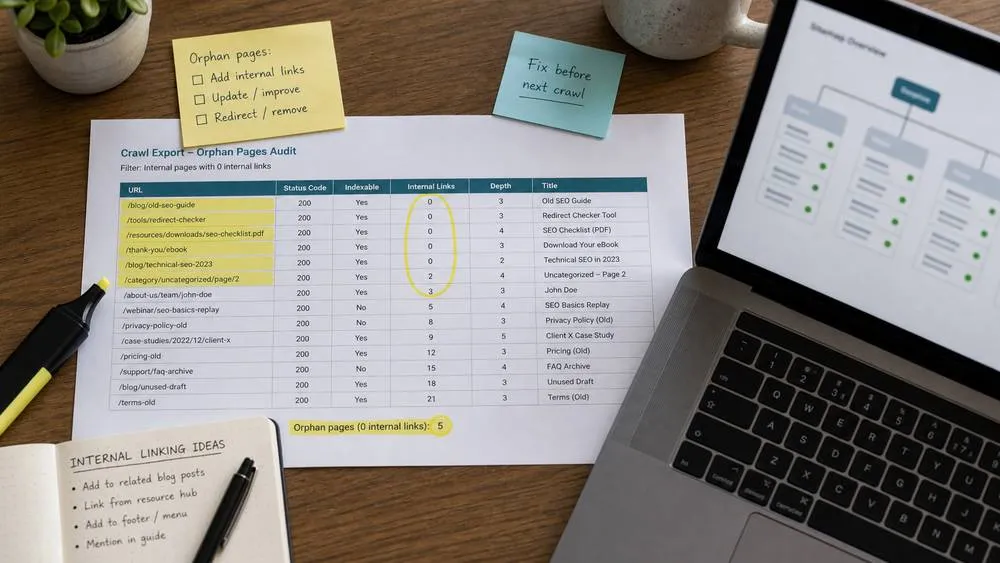
How do you find orphan pages?
To find orphan pages, compare all known URLs against the URLs found by a normal crawl. The crawl tells you what your site links to. Other sources tell you what exists. The difference between the two lists is where orphan candidates usually appear.
Start with a crawl of your public website. A crawl follows links from the home page and other discoverable pages, so it creates a map of the pages your site currently exposes. SerpCue's SEO audit tool is useful here because it gives you a site-wide view of crawlable URLs and on-page issues without turning the process into a spreadsheet marathon.
Then gather known URLs from other places. Export your XML sitemap, Search Console pages, analytics landing pages, CMS exports, old campaign URLs, and backlinks if you already have them. You do not need expensive data for a first pass. The most important sources are usually your own sitemap and Search Console.
A practical orphan-page check looks like this:
- Crawl list: URLs found by starting at the home page and following internal links.
- Sitemap list: URLs you tell search engines are part of the site.
- Search Console list: URLs Google has seen, indexed, or shown in search results.
- Analytics list: landing pages that received visits in the last 12 months.
- CMS list: published pages and posts that may not be linked anywhere.
If a URL appears in the sitemap, Search Console, analytics, or CMS list, but not in the crawl list, mark it as an orphan candidate. It is a candidate because there can be edge cases: JavaScript links, blocked sections, pagination, canonicalized pages, or pages that are intentionally outside normal navigation.
Once you have candidates, open a sample manually. Check whether the page loads, whether it is still accurate, whether it has a canonical tag, whether it is indexed, and whether another better page already covers the same intent.
Which orphan pages should you fix first?
Fix orphan pages in priority order, not alphabetically. The pages most worth saving are the ones that already show signs of value: impressions, clicks, conversions, backlinks, revenue relevance, or strong topical fit.
Use a simple scoring pass. A page deserves attention if it matches one or more of these signals:
- It gets impressions: Search Console shows Google already considers it for queries.
- It receives traffic: analytics shows visits, especially from search or referral sources.
- It supports a service: the page explains something that could help a visitor become a lead or customer.
- It has backlinks: another site points to it, so deleting it carelessly can waste authority.
- It fills a content gap: no other page answers the same useful question as well.
Do not save every page. Old giveaway pages, duplicate tag archives, empty category pages, thin campaign pages, and outdated announcements often create clutter. If a page no longer serves visitors and has no search value, redirect it to the closest useful page or remove it intentionally.
The wrong response is to add a huge footer link list called ?all pages.? That may technically remove the orphan status, but it does not create useful context. A better link comes from a page that is genuinely related: a hub page, service page, category page, supporting blog article, or resource section.

How do you fix orphan pages SEO?
To fix orphan pages SEO, choose one of four actions for each URL: link it, improve it, merge it, or remove it. The right action depends on whether the page is useful, unique, current, and aligned with search intent.
1. Link useful pages from relevant locations
If the page is useful and should stay, add contextual internal links from pages that already cover nearby topics. A service page can link to a detailed guide. A guide can link back to a related service or tool. A category page can expose important posts. The anchor text should describe the destination naturally, not repeat the exact keyword every time.
For example, if you have a hidden guide about image SEO, link to it from a broader on-page SEO checklist and from any page that discusses image optimization. If you have a buried service-area page, link to it from a location hub or relevant service page rather than from a random footer.
2. Improve pages that have potential but weak content
Some orphan pages are not ready to reconnect. They may be short, outdated, unclear, or missing the next step. Improve them before adding links. Update the intro, strengthen the headings, answer the query directly, add useful examples, check the title and meta description, and make sure the page has a clear place in the site.
3. Merge overlapping pages
If an orphan page covers the same intent as a stronger page, merge the useful parts into the stronger page and redirect the old URL. This is common after years of publishing similar posts. Keeping both pages can split internal signals and make your site harder to understand.
4. Remove or noindex pages that should not rank
Some pages should not be part of search at all. Internal search results, thin tag pages, duplicate campaign variants, and expired offers may be better removed, redirected, or noindexed. Do this intentionally and document the decision. Do not simply leave low-value pages floating around because you are afraid to delete them.
If the orphan page appears in your XML sitemap, make sure the sitemap reflects your decision. A sitemap should help Google discover important canonical URLs, not preserve every old experiment forever. If you need a refresher, the XML sitemap SEO guide explains what belongs there and what does not.

How do you prevent orphan pages from coming back?
Preventing orphan pages is mostly a publishing workflow problem. Every new public page should have a planned parent, a planned link source, and a reason to exist before it goes live.
Use a small pre-publish checklist:
- Which existing page will link to this new page?
- Does it belong in a category, hub, navigation section, or related article block?
- Does it replace an older page that should be redirected?
- Should it be included in the XML sitemap?
- Is the page meant for search, or should it stay noindex/private?
For small sites, review orphan candidates once a month. For larger sites, review after redesigns, migrations, bulk imports, product launches, and content cleanup projects. These are the moments when hidden URLs multiply.
Also be careful with CMS habits. A post can be published but not assigned to a category. A page can be duplicated and left live. A landing page can be created for an ad and never connected to the main site. The CMS says the page is published, but search engines and visitors need paths, not just database status.
Good orphan-page cleanup is not glamorous, but it compounds. You reduce crawl waste, clarify topic relationships, preserve valuable URLs, and make your best pages easier to discover. If you want a faster starting point, run a crawl with SerpCue's SEO audit tool, then compare those crawl results against your sitemap and Search Console pages.
FAQ
Are orphan pages bad for SEO?
Orphan pages are bad for SEO when they are useful public pages that deserve discovery but have no internal links. Intentional private or utility pages are different. The key question is whether searchers and visitors should be able to find the page through your normal site structure.
Can Google index an orphan page?
Yes. Google can sometimes discover an orphan page through a sitemap, external link, redirect, browser data, or old crawl history. But indexing is not the same as strong SEO performance. A page with no internal links usually has less context and weaker internal authority.
Should orphan pages be in the XML sitemap?
Important canonical pages can be in the XML sitemap, but they should also be linked from relevant pages. If a URL is only in the sitemap and nowhere else, treat that as a sign to review it. If the page is low value, remove or redirect it instead of relying on the sitemap.
How many internal links does an orphan page need?
There is no magic number. One strong contextual link from a relevant page can be more useful than ten random footer links. Start with the page's natural parent, then add supporting links where the destination genuinely helps the reader.
How often should I check for orphan pages?
For a small site, a monthly or quarterly check is usually enough. Run an extra check after redesigns, migrations, content imports, navigation changes, and large publishing sprints because those are the moments when orphan pages tend to appear.


