Internal Linking for SEO: A Simple Guide for Site Owners
A practical internal linking guide for choosing priority pages, writing anchor text, and connecting related content without making a mess.

Internal linking is the way pages on your site point to each other. Done well, it helps visitors find the next useful page and helps search engines understand which pages matter most. Done badly, it becomes a maze of random "click here" links, orphan pages, and important service pages nobody can reach.
The good news: you do not need a huge strategy deck to improve internal links. You need a short list of priority pages, a habit of linking from related content, and anchor text that sounds like a helpful signpost instead of a keyword robot wearing a tiny hat.
This guide shows you how to use internal linking for SEO without making your site messy.
Table of contents
- What is internal linking?
- Why does internal linking matter for SEO?
- Which pages should you link to first?
- How should you use anchor text?
- What is a simple internal linking workflow?
- What internal linking mistakes should you avoid?
- FAQ
What is internal linking?
Internal linking means linking from one page on your site to another page on the same site. A blog post can link to a service page. A service page can link to a guide. A guide can link to a pricing page, case study, related article, or product page.
External links point to other websites. Internal links build paths inside your own website. That sounds simple because it is simple. The strategy comes from choosing which paths deserve more attention.
If your site were a small town, internal links would be the road signs. You can have a beautiful main street, but if there are no signs pointing people to the bakery, nobody finds the bakery. Search engines work differently from people, but they also use links to discover pages and understand relationships.
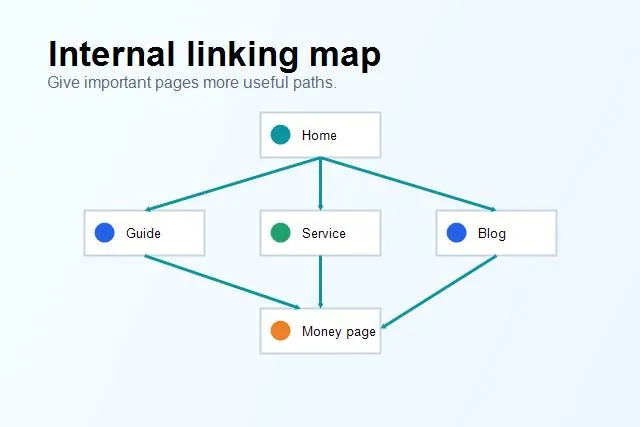
A useful internal link map gives important pages more clear paths from related content.
Why does internal linking matter for SEO?
Internal links help SEO in four practical ways.
First, they help discovery. If a page is not in your navigation, sitemap, or linked from other pages, search engines may find it slowly or treat it as unimportant. A page with no internal links pointing to it is often called an orphan page. Orphans are not always invisible, but they are rarely living their best SEO life.
Second, internal links show relationships. If several articles about site speed link to a guide about technical SEO, that guide starts to look like a central resource. If multiple posts about WordPress problems link to your WordPress SEO tool page, the relationship is clear for both readers and crawlers.
Third, internal links pass authority around your site. Pages that earn links, traffic, or visibility can help related pages by linking to them naturally. This does not mean every page should link to every sales page. It means useful paths can make important pages easier to find and understand.
Fourth, internal links improve user flow. A reader who finishes a guide on title tags might naturally need help with meta descriptions, on-page checks, or broken links. If the next step is obvious, they stay engaged. If the next step is hidden, they leave and go make coffee. Coffee is lovely, but it is not a conversion.
Which pages should you link to first?
Start with your priority pages. These are the pages that matter commercially or strategically: service pages, product pages, pricing pages, comparison pages, lead-generation pages, important guides, and pages that already get impressions but need support.
Make a short list. Five to ten pages is enough for a first pass. If you try to map your entire site in one afternoon, you will probably create a spreadsheet so large it develops its own weather system.
For each priority page, ask three questions:
- Which existing pages are closely related to this topic?
- Which pages already get traffic or impressions?
- Where would a link genuinely help the reader take the next step?
Then add links from those related pages. If you have an article about an on-page SEO checklist, it can naturally link to guides about title tags, meta descriptions, alt text, internal links, and technical audits. That is useful because the topics belong together.
Do not force unrelated links just because a page is important. A recipe blog post linking to enterprise server migration is not strategy. It is chaos with blue underlines.
How should you use anchor text?
Anchor text is the clickable text in a link. Good anchor text tells the reader what they will get if they click. It also gives search engines context about the destination page.
Use natural, descriptive anchors. If the destination is a guide to title tags, link with text like title tags for SEO or "how to write better title tags." If the destination is a broken link guide, use a phrase like find and fix broken links.
Avoid vague anchors when the context is not obvious. "Click here" can work for accessibility in some designs if surrounding text is clear, but most SEO and content links should be more specific. Also avoid stuffing the same exact keyword into every link. Natural variation is healthier and reads better.
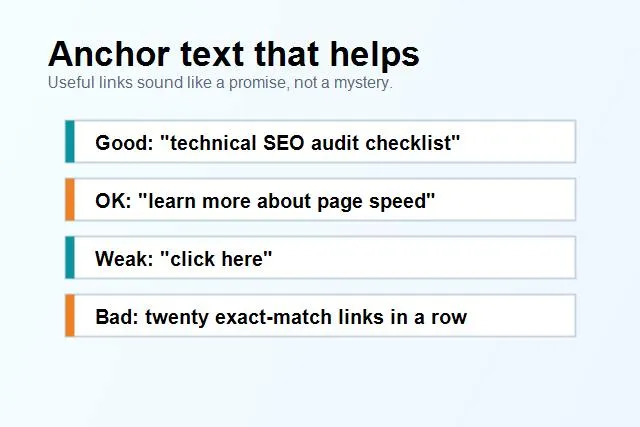
Anchor text should explain the next step without sounding forced or robotic.
The best anchor text feels like part of the sentence. It does not wave its arms and shout, "I AM DOING SEO NOW." It just helps the reader continue.
What is a simple internal linking workflow?
Use a small repeatable workflow. Internal linking gets messy when you only do it once a year. It gets much easier when it becomes part of publishing and updating content.
Here is a simple process:
- Choose one priority page you want to support.
- Search your site for related pages using the main topic, synonyms, and subtopics.
- Pick five pages where a link would genuinely help the reader.
- Add one natural link from each page to the priority page.
- Add links from the priority page back to helpful supporting content where appropriate.
- Check that the links work and that the anchor text is clear.
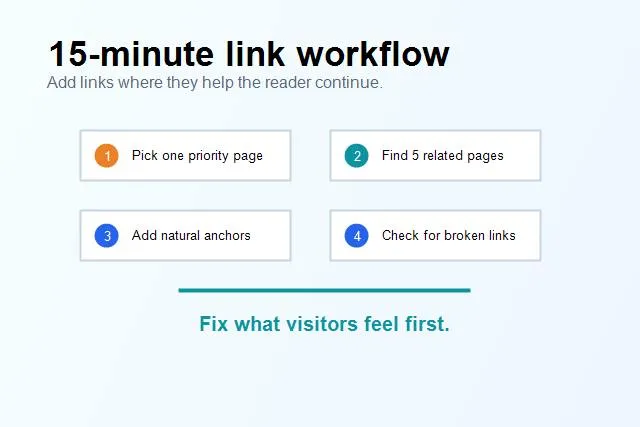
A small weekly linking habit is easier to maintain than a giant one-time cleanup.
For example, suppose your priority page is a technical SEO audit page. Good supporting pages might include Core Web Vitals, broken links, on-page SEO, XML sitemaps, indexability, and Search Console setup. A bad supporting page would be something unrelated just because it has traffic.
SerpCue can help by showing existing issues and opportunities, but the human decision is still important: does this link help the reader? If the answer is yes, add it. If the answer is "well, technically I can squeeze it in," maybe go outside and let the link cool off.
What internal linking mistakes should you avoid?
The first mistake is linking only from the navigation. Navigation is useful, but contextual links inside content often explain relationships better. A service page in the menu tells visitors it exists. A relevant guide linking to that service page tells visitors why it matters now.
The second mistake is using too many links in one paragraph. If every third word is a link, nothing feels important. Links should guide, not glitter-bomb the reader.
The third mistake is using identical exact-match anchors everywhere. If every link says "best SEO audit tool" and points to the same page, it looks unnatural and reads badly. Use descriptive variation. You are writing for humans first.
The fourth mistake is forgetting old content. New posts often link to old posts, but old posts rarely get updated to link to new resources. This is where many easy wins hide. When you publish a new important guide, go back to older related pages and add links forward.
The fifth mistake is leaving broken links in place. Internal links are only helpful if they work. A simple broken link check should be part of your cleanup.
How many internal links should a page have?
There is no magic number. A short page might need only a few links. A long guide might naturally include many. The better question is whether each link has a job.
A useful internal link should do at least one of these things:
- Help the reader understand a related idea.
- Point to a logical next step.
- Support an important page that deserves visibility.
- Connect a topic cluster together.
- Help search engines discover or interpret the destination page.
If a link does none of those things, remove it. Your site is not a link museum.
How do you audit internal links?
Start with your most important URLs. For each page, check how many internal links point to it, where those links come from, and what anchor text they use. You are looking for gaps, not perfection.
Common findings include important pages with too few internal links, old posts that link to outdated URLs, duplicate pages competing for the same intent, and pages that receive many links with vague anchors.
Then compare this with search data. If a page has impressions but weak clicks or average position, better internal linking can be one support move alongside stronger titles, meta descriptions, and content improvements. If a page has no impressions because it is not discoverable, internal links may help search engines find and value it.
This is also why internal linking belongs inside a broader SEO audit. Links are not separate from page quality. They connect your content, your structure, and your business goals.
FAQ
Are internal links a ranking factor?
Internal links help search engines discover pages, understand site structure, and interpret relationships between pages. They are not a magic button, but they are a real part of technical and on-page SEO.
Should every blog post link to a service page?
No. Link when the service page is a natural next step. If the post and service page are related, a link can be helpful. If they are unrelated, forcing the link weakens the reader experience.
Can too many internal links hurt SEO?
Too many low-value links can dilute clarity and make a page harder to use. The issue is not the raw number alone. The issue is whether the links are useful, relevant, and easy to understand.
How often should I update internal links?
Review internal links whenever you publish a new important page, update old content, delete or redirect URLs, or run a site audit. A monthly check is a good rhythm for active sites.
Final thought
Internal linking is not glamorous, but it is one of the most practical SEO habits a site owner can build. It helps people move through your site, helps search engines understand your pages, and helps important URLs stop hiding in the corner.
Start small. Pick one priority page, find five related pages, add helpful links, and check that everything works. Then do it again next week. That boring rhythm is how a site starts to feel organized instead of accidental.


