Website Redesign SEO Checklist: Protect Traffic Before Launch
A website redesign SEO checklist for protecting URLs, redirects, content, metadata, crawlability, analytics, and rankings before and after launch.

A website redesign SEO checklist protects your organic traffic by preserving important URLs, redirects, content, metadata, crawlability, analytics, and Search Console visibility before the new site goes live. The safest redesign is planned like a small migration, not treated as a visual refresh that SEO can ?clean up later.?
If your current site gets any organic traffic, even a simple redesign can break rankings. Navigation changes can bury important pages. New templates can remove headings. Image-heavy sections can slow the page. URL changes can create 404s. Tracking can disappear right when you need it most.
Table of contents
- Why do website redesigns risk SEO?
- What should you check before the redesign starts?
- How do you build a URL and redirect map?
- What SEO checks belong on the staging site?
- What should you check on launch day?
- What should you monitor after launch?
- FAQ
Why do website redesigns risk SEO?
Website redesigns risk SEO because they change the signals search engines already understand. A redesign can change page URLs, internal links, page titles, headings, copy, image delivery, schema, canonical tags, robots settings, and page speed. Each change may be small on its own, but together they can make a familiar site look like a different site.
The common mistake is focusing only on the new visual layout. Design matters, but search engines rank URLs and content. If a page that used to answer a query is removed, rewritten poorly, slowed down, blocked, or redirected incorrectly, the new design will not protect the ranking.
Another mistake is waiting until after launch to think about SEO. By then, the old site may already be overwritten, the old URL list may be incomplete, and tracking may not show what changed. You want a baseline before the redesign, a checklist during build, and monitoring after launch.
If the redesign is already live and traffic has dropped, use the website traffic dropped guide to diagnose the loss. This checklist is about preventing that situation before it happens.
What should you check before the redesign starts?
Before a redesign starts, save a clean picture of the current site. This protects you from guessing later. You need to know which pages exist, which pages get traffic, which pages rank, and which technical signals are currently working.
Start with a crawl of the current site. Export every indexable URL, title tag, meta description, H1, canonical target, status code, word count, internal links, images, and schema notes. A fresh crawl from SerpCue's SEO audit tool gives you a practical baseline before templates change.
Then export Search Console data. Save top pages, top queries, clicks, impressions, average position, and click-through rate for the last 3 to 6 months if you have enough data. This tells you which pages deserve extra protection. A page with modest traffic but strong commercial intent may be more important than a blog post with broad informational traffic.
Also collect analytics landing pages, conversion pages, paid campaign URLs, and any URLs used in email campaigns. SEO is not the only channel affected by broken redirects. A redesign can quietly break useful pages that do not show up in a crawl because they were already hard to find.
Finally, agree on which pages are staying, being merged, being rewritten, or being removed. This decision should happen before design implementation. If everyone waits until launch week, SEO decisions become rushed and political.
How do you build a URL and redirect map?
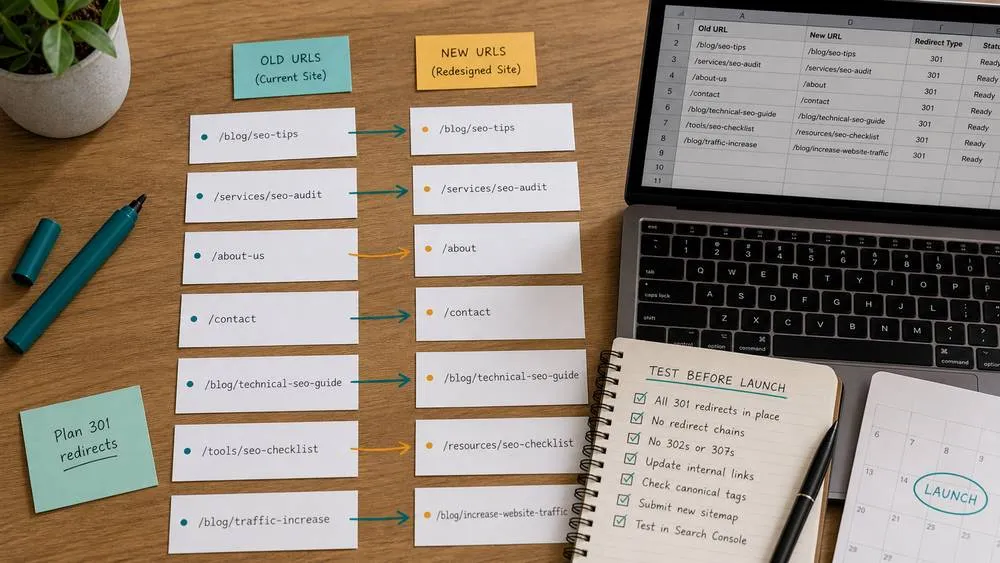
A redirect map lists old URLs, their new destinations, and the reason for the change. It is the most important document in many redesigns because URL mistakes can erase years of accumulated signals.
Make the map simple:
- Old URL: the current live URL.
- New URL: the best equivalent page on the redesigned site.
- Status: keep, redirect, merge, remove, or noindex.
- Priority: high, medium, or low based on traffic, links, and business value.
- Notes: why the decision was made.
Use one-to-one redirects when possible. If `/services/local-seo` becomes `/small-business-seo-services`, redirect old to new directly. Avoid redirecting many unrelated pages to the home page. That is a poor user experience and often a weak SEO signal because the destination does not match the old intent.
Do not forget trailing slash variants, HTTP to HTTPS, www to non-www, uppercase versions, and URLs with query parameters that receive traffic. You may not need a separate redirect for every parameter, but you should know which variants matter.
Canonical tags also need review. If the new site introduces duplicate templates, printer views, filter URLs, or tracking variants, a correct canonical can help consolidate signals. The canonical tags for SEO guide explains this in more detail.
What SEO checks belong on the staging site?
The staging site should be reviewed before launch, but it should not be indexable. That means the staging environment must be protected from search engines while still easy for your team to test. A staging site accidentally indexed by Google can create duplicate content and messy search results.
Check robots settings carefully. Staging often uses a noindex rule or password protection. That is fine for staging. The danger is forgetting to remove noindex when the site goes live. If you need the difference between noindex, robots.txt, and crawl blocking, read the noindex tag guide before launch.
On staging, review the pages that matter most first. Do not spend the whole QA window polishing a low-traffic archive while service pages are missing headings. Use your pre-redesign baseline to choose priority pages.
Check these items on staging:
- Page titles are present, unique, and not replaced by generic template text.
- Meta descriptions are present on priority pages.
- Each important page has one visible H1 in the public layout.
- H2/H3 headings still explain the page clearly.
- Important body copy was not cut during design.
- Internal links point to the new final URLs, not staging URLs.
- Images have useful alt text and reasonable file sizes.
- Schema markup is still valid where it matters.
- Canonical tags point to the final public URL pattern.
- Mobile layout does not hide important content or CTAs.

What should you check on launch day?
Launch day is for verification, not strategy. The decisions should already be made. Your job is to confirm that the live site matches the plan and that search engines can access the correct pages.
Run these checks immediately after launch:
- Important URLs return 200 status codes.
- Old important URLs redirect to the correct new URLs with 301 redirects.
- No priority page is accidentally noindexed.
- The XML sitemap contains the correct canonical URLs.
- The sitemap is submitted or resubmitted in Search Console.
- Analytics and conversion tracking are firing.
- Search Console can inspect and fetch important URLs.
- Robots.txt does not block important pages, scripts, or images.
- Navigation and internal links use final production URLs.
- Core templates load quickly on mobile.
Do not assume the deploy went perfectly because the home page looks right. Many redesign problems hide one click deeper: blog posts, old service URLs, paginated archives, image paths, schema output, or canonical tags. Spot-check different page types, not just different pages.
Your XML sitemap should also be clean. It should list the URLs you want discovered, not staging URLs, old URLs, or pages that redirect. If you are unsure what belongs there, review XML sitemap SEO before submitting the new file.
What should you monitor after launch?
After launch, monitor both technical health and search performance. Some volatility is normal, especially if URLs, templates, and internal links changed. The goal is to separate normal recrawling from real problems quickly.
For the first week, check crawl errors, index coverage, sitemap status, top landing pages, redirects, server errors, page speed, and conversion tracking. For the first month, compare clicks, impressions, average position, and click-through rate against your pre-launch baseline.
Look for patterns rather than panic over one query. If one page drops but similar pages are stable, inspect that URL. If an entire section drops, inspect templates, internal links, canonical tags, and robots settings for that section. If impressions collapse across many pages, check whether indexing or crawl access changed.

Keep a launch log. Record the launch date, redirect changes, template changes, content changes, sitemap updates, and any tracking changes. If performance moves, the log helps you connect the movement to actual work instead of guessing.
A redesign can improve SEO when it makes the site clearer, faster, and easier to navigate. But it only helps when the old value is preserved. Treat the redesign like a controlled migration: protect what works, fix what is broken, and measure the result after launch.
FAQ
Will a website redesign hurt SEO?
A redesign can hurt SEO if it removes useful content, changes URLs without good redirects, slows pages down, blocks crawling, or weakens internal links. It can also help SEO if it improves structure, speed, clarity, and conversion paths while preserving important URLs and content.
Should I keep the same URLs during a redesign?
Keep important URLs the same when there is no strong reason to change them. If a URL must change, redirect the old URL to the closest matching new URL. Avoid redirecting unrelated pages to the home page.
When should I involve SEO in a redesign?
Before design and development decisions are locked. SEO should be involved during content inventory, URL planning, navigation planning, staging QA, launch checks, and post-launch monitoring.
How long does it take Google to adjust after a redesign?
It varies by site size, crawl frequency, and how much changed. Small changes may settle quickly; larger migrations can take weeks or longer. Monitor trends over several weeks rather than reacting to one day of data.
What is the biggest SEO mistake in a redesign?
The biggest mistake is launching without a URL inventory and redirect map. If you do not know which URLs mattered before launch, it is much harder to protect traffic or diagnose drops afterward.


