Why Old Posts Lose Traffic
Content decay is the slow traffic loss on pages that used to work. Here is how to spot it in Search Console and what a real refresh involves.
Content decay is the slow loss of traffic to a page that used to perform well. Nothing broke, nothing was penalised, and the page is still indexed. It simply drifts down the results as the information ages, competitors publish something better, or the question people ask changes shape.
It is the most common reason a site's traffic falls without any obvious cause, and it is also the cheapest problem in SEO to fix — because refreshing a page that already has history is far easier than getting a new one to rank.
What does content decay look like?
The pattern is recognisable once you have seen it. A post climbs for two or three months after publication, holds a good position for a while, then loses ground slowly enough that no single week looks alarming.
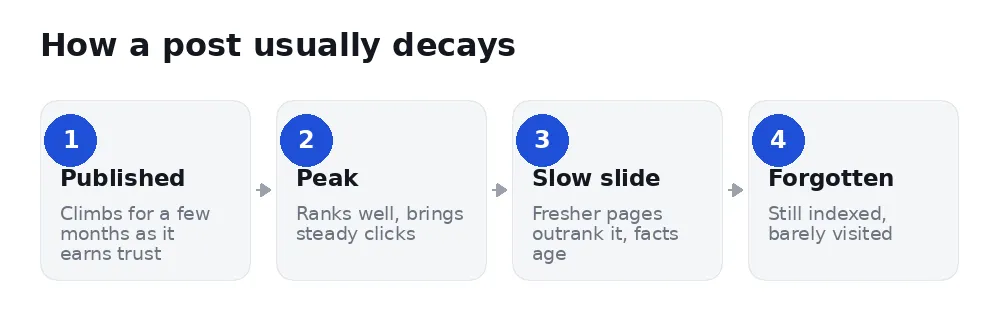
Because the decline is gradual, most site owners notice it only when they compare a quarter with the same quarter last year. By then a page might have lost half its clicks.
Why do old posts lose traffic?
Five causes account for almost all of it:
1. The facts aged. Prices, statistics, screenshots, "in 2024…" — a reader who spots one stale detail stops trusting the rest of the page, and so does Google.
2. Someone published something better. Your page has not got worse; the competition improved. Ranking is relative, always.
3. The query changed. People searching "SEO tools" in 2022 wanted rank trackers. In 2026 many want AI visibility. Same words, different intent, and a page written for the old intent stops matching.
4. You competed with yourself. A newer post on a similar subject can split your own signals — see keyword cannibalization.
5. Internal links dried up. Older posts stop being linked from newer ones and quietly lose the internal support that helped them rank.
Which declines are worth fixing?
Not every drop is decay, and chasing the wrong ones wastes weeks.
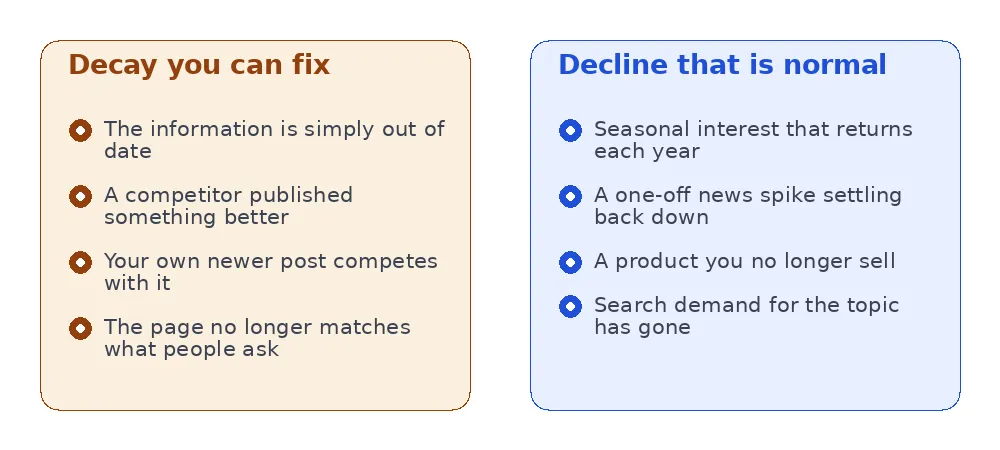
A page about tax deadlines falling in June is seasonal, not decaying. A news post that spiked and settled did exactly what news posts do. But a guide that answered a permanent question and lost 60% of its clicks is worth an afternoon.
How do you find decaying pages?
Google Search Console has everything you need, free.
- Open Performance → Search results.
- Set the date range to Compare, and pick Last 3 months vs previous period.
- Switch to the Pages tab.
- Sort by the click difference column, ascending, so the biggest losses come first.
Ignore pages that never had traffic — a page going from 3 clicks to 1 is noise. Look for pages that had real volume and lost a meaningful share of it. That is the shortlist.
One caution worth repeating: a page can lose clicks while keeping its position, because the result page changed around it. An AI overview or a new set of featured snippets can take clicks from a page that never moved. Check the position column before assuming you slipped.
How do you refresh a page properly?
Refreshing is not changing the date and republishing. Google compares the content, not the timestamp, and a "2026 update" with 2023 content fools nobody for long.
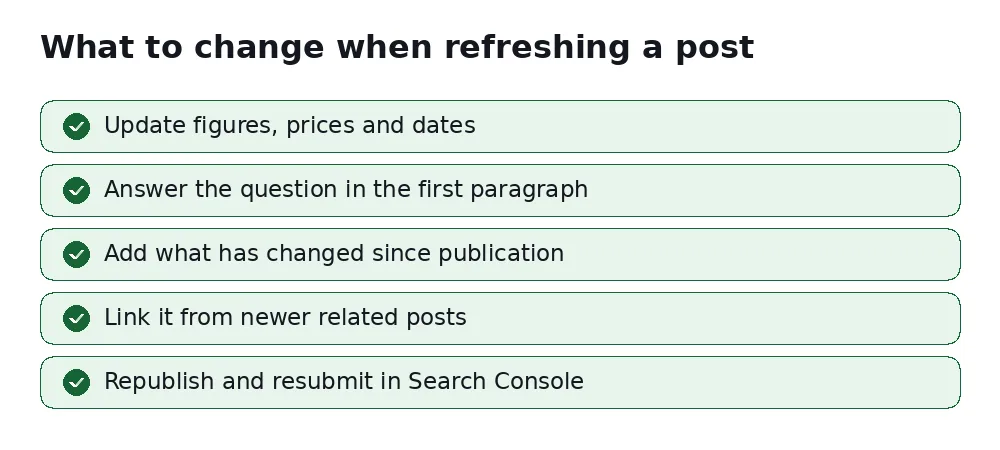
Start by reading the page as a stranger. Does it still answer the question in the title? Would you act on this advice today?
Fix the specifics. Numbers, prices, product names, screenshots of interfaces that have since been redesigned. These are what make a page feel abandoned.
Add what changed. This is where the value is. If the subject moved on, say how — that is genuinely new information, and it is the part a competitor's older page will not have.
Tighten the opening. Many older posts bury the answer under 300 words of preamble. Put it in the first paragraph.
Link it from newer posts. Two or three internal links from recent, related articles restore the support the page lost.
Then request indexing in Search Console so the update is picked up in days rather than weeks.
A worked example
Say you run a domestic cleaning company and published "How much does a deep clean cost?" three years ago. It brought 400 clicks a month for two years. Last quarter it brought 150.
You open the page and find: prices from three years ago, a screenshot of a booking form you have since replaced, and no mention of the two questions customers now ask constantly — whether you bring your own products, and whether the price changes for pets.
The refresh is not subtle. You update the price table, add two new sections answering those questions, delete a paragraph about a service you dropped, and move the price range into the first paragraph instead of leaving it under a heading halfway down. Total time: ninety minutes.
That page now answers the 2026 version of the question, and the competitor who wrote theirs in 2024 does not. This is the whole method — there is no trick beyond genuinely being more current and more complete than the page currently above you.
How much of a drop is worth worrying about?
Search traffic is noisy, and reacting to noise is how people waste months. Some rough guidance:
- Under 15% quarter on quarter — normal variation. Leave it.
- 15–30% with stable position — the result page probably changed around you (an AI overview, more ads, a new snippet). Improving the page may not recover the clicks.
- Over 30% with a falling position — genuine decay. This is the one worth your afternoon.
Always check position alongside clicks. A page that held position 4 and still lost half its traffic did not decay in any sense you can fix by editing — the search result itself changed shape.
How long until a refresh shows results?
Usually two to six weeks for a page that already has history, which is much faster than a new page. If nothing moves after two months, the problem is probably not freshness — it is that a competitor's page is genuinely more useful, and matching it needs more than an edit.
Track it honestly: note the page's average position and monthly clicks on the day you refresh, then compare the same 28-day window a month later. Without a before, "it feels better" is all you will ever have.
How often should you check?
Quarterly is enough for most sites. Decay works in months, not days, and checking weekly only produces noise you will over-react to.
A practical rhythm: once a quarter, list the ten biggest click losses, refresh the three that still matter to your business, and leave the rest. Trying to refresh everything is how the habit dies.
FAQ
Should I delete pages that decayed?
Rarely. A page with history is an asset. Delete only if the topic is genuinely dead or the page was thin to begin with — and redirect it to the closest relevant page rather than leaving a 404.
Does changing the publish date help?
On its own, no. Change it when you have genuinely updated the content, because the date is then true. Changing it without changing the page is the kind of trick that works briefly and costs trust.
Is it better to refresh or write something new?
Refresh first, almost always. An existing page has links, age and data behind it. A new page starts from nothing.
Can decay be caused by a Google update?
It can, and the timing usually gives it away: an update-driven drop happens over days, not months. If the fall is a cliff rather than a slope, look at the date rather than the content.
Do I need to rewrite the whole page?
Almost never. Most successful refreshes change perhaps a third of a page: the outdated specifics, the opening, and one or two new sections answering questions that have emerged since. Rewriting from scratch usually loses what made the page work.
Should I refresh pages that are still doing fine?
Only if the facts on them have gone stale. A page holding its position with accurate content needs nothing, and editing it introduces risk for no expected gain.
See your own decaying pages
SerpCue's Content Decay screen compares your recent Search Console window against the earlier one and lists the pages that genuinely lost clicks, ranked by how many. Crucially, when there is not enough history to compare, it says so — it will not show you a reassuring green tick it has not earned.


