How to Audit a Page for SEO
A ten-minute, no-tools method for auditing one page: indexability first, then the click, then the content, then clarity for machines.

Auditing a single page for SEO means checking, in a sensible order, whether Google can index it, whether it earns the click, and whether it clearly answers the question it targets. It takes about ten minutes by hand and you need no paid tools.
This guide is deliberately about one page rather than a whole site. Most people do not need a 300-page crawl — they need to know why this page is not working.
Why audit one page instead of the whole site?
Site-wide audits produce hundreds of findings and no decisions. Auditing the page that matters — your main service page, the article that used to rank — gives you a short list you will actually act on.
It is also how you learn what the checks mean. Run this three times and you will start noticing the same problems as you write, which is worth more than any report.
What order should you check things in?
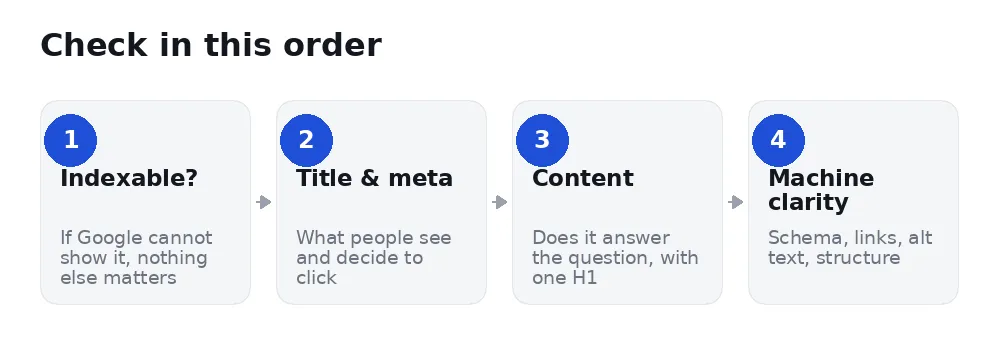
The order matters because the checks are not equal. There is no point polishing a meta description on a page Google is not allowed to show.
Step 1: Can Google index it?
Paste the URL into URL Inspection in Google Search Console. It will tell you plainly whether the page is indexed, and if not, why.
The two answers that stop everything else: Excluded by 'noindex' tag and Blocked by robots.txt. Fix those first — see what a noindex tag really does. Also check the canonical: a page whose canonical points somewhere else is telling Google to index the other page instead.
Step 2: Does it earn the click?
Your title and meta description are the advert. A page can rank third and still lose to the page below it.
Title: aim for 30–60 characters, with the specific thing the page is about near the front. "Emergency Plumber in Leeds — 24/7 Callout" beats "Services | Acme Ltd".
Meta description: 120–160 characters. Google may rewrite it, but writing one gives you a say. Say what the reader gets, not what your company believes about quality.
A useful test: read the two lines together and ask whether you would click them over a competitor's. That question finds more improvements than any character counter.
Step 3: Does the content answer the question?
One H1, matching the page's purpose. Not zero, not four. Many themes turn a logo or a slogan into an H1, which is why pages sometimes have several without the author knowing.
The answer near the top. If the title asks a question, the first paragraph should answer it. Making people scroll past 400 words of preamble is how you lose them — and increasingly how you lose AI assistants, which quote clear statements.
Enough substance to be useful. Word count is not a target; being complete is. If a competitor's page answers three follow-up questions yours ignores, that is the gap — not the word count.
Subheadings people would actually type. "How much does it cost?" is a better H2 than "Pricing Information".
Step 4: Is it clear to machines?
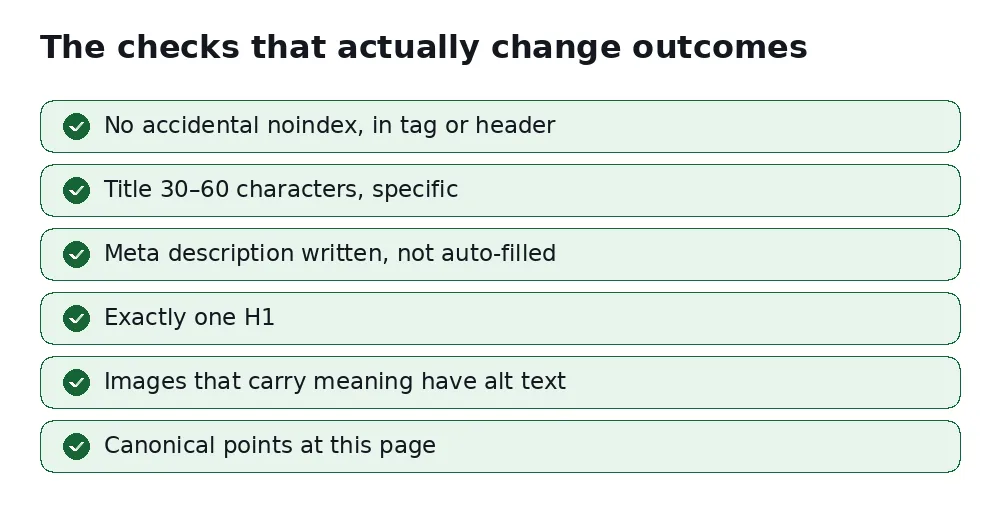
Alt text on images that carry meaning. Note the qualifier: a decorative divider or a background flourish should have an empty alt="", which is correct and deliberate, not a fault. See our guide to alt text.
Structured data. Organization or LocalBusiness markup states who you are as a fact rather than an inference — which matters more each year as AI assistants answer questions about businesses.
Internal links. A page with no links pointing at it from elsewhere on your site looks unimportant, because you have implied it is.
The language attribute. An easy one to miss: many themes ship lang="en-US" and nobody changes it, so a Serbian or German site tells Google it is American English.
You found five problems. What do you fix first?
Findings are not equal, and treating them as a flat list is why audits get abandoned. Work in this order:
- Anything that stops indexing. A noindex, a wrong canonical, a robots.txt block. Total effect, usually a five-minute fix.
- The title. It decides whether people click a position you already have. Cheapest real gain available.
- The opening paragraph. Answer the question up top. Helps readers, helps snippets, helps AI assistants quote you.
- Missing meta description. Ten minutes, and you control what shows under your result.
- Everything else. Schema, alt text, internal links — worth doing, rarely the reason a page is failing.
If you only ever do the first three, you will have captured most of the available benefit from on-page work.
A worked example
An electrician audits their main service page and finds: the title is "Home | Volt Electrical", there is no meta description, there are two H1s (the logo and the page heading), 9 of 14 images have no alt text, and there is no LocalBusiness schema.
Indexability is fine, so nothing is urgent. The title is the biggest loss — it tells a searcher nothing and wastes the position the page already holds. It becomes "Emergency Electrician in Bristol — Same-Day Callout".
Next the opening paragraph, which currently begins "Welcome to our website". It becomes a sentence naming the service, the area covered and the call-out fee.
Then a meta description, then the theme's logo H1 changed to a div, then alt text on the photos that show actual work (the decorative background stays empty, correctly). Schema last.
Total time: under an hour. The two changes that matter — title and opening — took fifteen minutes of it.
What should you not bother with?
Plenty of audit tools flag things that will not change your outcome: keyword density, exact-match keywords in the URL, inline styles, a missing AMP version, the precise number of outbound links. None of these decides whether you rank.
Spending your ten minutes on indexability, the title, and whether the page answers the question will beat a 40-point checklist every time.
How often should you audit a page?
When something changes. After a redesign, after a CMS migration, when a page's traffic drops, or before you promote it. Auditing pages that are performing well and have not changed is a way to feel productive without being productive.
FAQ
Do I need a paid tool?
No. Search Console plus view-source covers most of it. Tools save time and catch things at scale; they do not know anything you cannot check.
How long until fixes show up?
Title and meta changes can show within days once recrawled. Content improvements usually take weeks. Indexability fixes take effect as soon as the page is recrawled.
What if everything checks out and the page still does not rank?
Then on-page is not the constraint. Usually it is competition — someone else's page is genuinely more useful or more trusted. That needs better content or better links, not another audit.
Should I audit before or after publishing?
Both, briefly. Check indexability and the title before publishing; audit properly a month later, once Search Console has data showing which queries the page actually attracts. Those queries often differ from the ones you wrote for, and that gap is the most useful edit you will make.
Is a perfect score worth chasing?
No. Audit scores measure the checks a tool can run, not whether your page deserves to win. A page scoring 100 with nothing original on it will lose to an 80 written by someone who does the work. Use the score to catch mistakes, not as a goal.
Do it in ten seconds instead
Our free page check runs 24 of these checks on any URL — indexability including the X-Robots-Tag header, title, meta, headings, alt text, schema, language and more — grouped into four scored sections. No account, and it shows every finding rather than hiding the rest behind an upgrade.


