Core Web Vitals Explained: Fix the Speed Issues That Matter
A practical guide to Core Web Vitals, including LCP, INP, CLS, and the speed fixes that matter most for site owners.

Core Web Vitals are Google's way of measuring whether a page feels fast, responsive, and stable for real visitors. For a site owner, the useful version is simple: make the main content appear quickly, make taps and clicks respond without lag, and stop the page from jumping around while someone is trying to read or buy.
You do not need to become a performance engineer to improve them. You need to know which number is causing the pain, fix the biggest visible problem first, and recheck after the change. That is the whole game. Not glamorous, maybe, but very good for keeping visitors on the page.
This guide explains Core Web Vitals in plain English, shows you what to check first, and gives you a practical workflow you can use even if you are doing SEO yourself.
Table of contents
- What are Core Web Vitals?
- Why do Core Web Vitals matter for SEO?
- How do you check Core Web Vitals?
- How do you fix LCP?
- How do you fix INP?
- How do you fix CLS?
- What should you fix first?
- FAQ
What are Core Web Vitals?
Core Web Vitals are three page experience metrics: Largest Contentful Paint, Interaction to Next Paint, and Cumulative Layout Shift. The names sound like something invented to make normal people close the tab. The meaning is much friendlier.
Largest Contentful Paint (LCP) measures how long it takes for the main visible content to load. On a blog post, that might be the hero image or headline area. On a product page, it might be the main product image. If LCP is slow, the page feels slow even if the rest of the site is technically doing many things in the background.
Interaction to Next Paint (INP) measures how quickly the page responds after a visitor interacts with it. If someone taps a menu, opens a filter, clicks a button, or types into a form and the page hesitates, INP is the metric that catches that frustration.
Cumulative Layout Shift (CLS) measures unexpected movement. You know the classic version: you try to tap one button, an ad or image loads above it, and suddenly your finger hits something else. CLS is the "stop moving the furniture while I am walking through the room" metric.
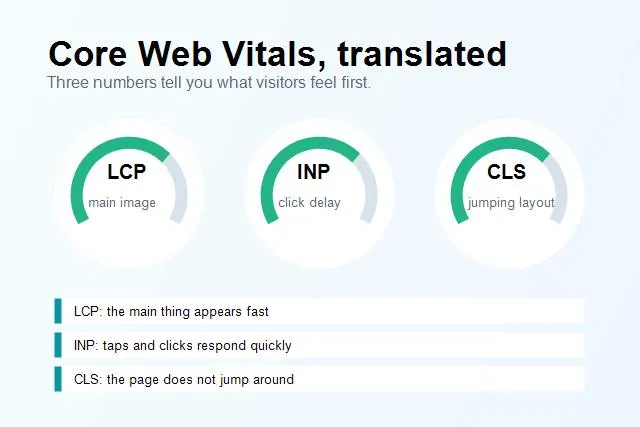
Core Web Vitals are easier to fix when you separate loading speed, responsiveness, and visual stability.
Why do Core Web Vitals matter for SEO?
Core Web Vitals matter because they sit at the intersection of SEO and user experience. Google wants to send searchers to pages that answer the query and are not painful to use. Visitors want the same thing, just with less terminology.
They are not a magic ranking lever. A fast but useless page will not beat a slower page that answers the query perfectly. But when two pages are otherwise close, experience can help. More importantly, speed affects the human parts of SEO: whether people stay, read, click, contact you, buy, or bounce back to search results.
For small business and DIY site owners, the practical benefit is even clearer. A slow page can quietly waste traffic you already earned. If you worked to get impressions and clicks, you do not want the first experience to be a blank screen, a sticky button that ignores taps, or a layout that jumps while someone is reading.
Think of Core Web Vitals as a smoke alarm, not a trophy cabinet. The goal is not to polish the score forever. The goal is to find the fire and put it out.
How do you check Core Web Vitals?
Start with PageSpeed Insights. Enter the URL you care about, then look at the real-user data if it is available. Real-user data is field data: it comes from people who actually visited pages like yours in Chrome. That is more useful than a lab test when enough data exists.
If your site does not have enough field data, use the lab section as a clue. Lab data is a controlled test. It is not the whole truth, but it can point at obvious problems like an oversized hero image, render-blocking CSS, JavaScript doing too much work, or missing width and height attributes on images.
Google Search Console also has a Core Web Vitals report. It groups URLs into poor, needs improvement, and good buckets. That report is useful for seeing patterns across the site. If one template is slow, you may see many similar URLs grouped together. That is good news because one template fix can improve many pages.
Inside SerpCue, use the SEO audit tool as the practical layer around this work. The point is not just "your page is slow." The useful question is: which page should you fix first, and what action is most likely to help?
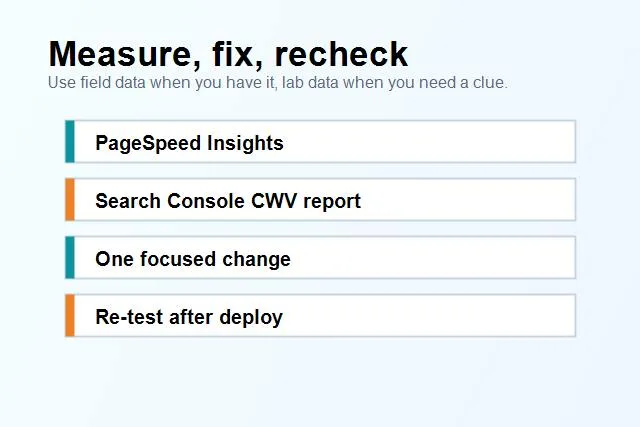
Use a simple measure-fix-recheck loop so speed work does not turn into guesswork.
How do you fix LCP?
LCP is usually about the most important visible thing on the page. If that thing is a large image, oversized background, slow font, or content waiting behind render-blocking files, visitors feel the delay immediately.
Start with the hero image. If the image is displayed at 500 pixels wide but the browser downloads a 2400-pixel file, you are making every visitor carry a sofa through a hallway when a chair would do. Resize it to the actual display size, compress it, and use a modern format like WebP or AVIF where possible.
Next, make the LCP image easy for the browser to discover. If it is the main image above the fold, do not lazy-load it. Consider using etchpriority="high" for the main LCP image and explicit width and height attributes so the browser can plan the layout early.
Then check render-blocking CSS and fonts. A stylesheet can block the first paint if it is large and loaded before the browser can show anything useful. Fonts can also slow the first meaningful view, especially if several weights load from a third-party domain. If your site loads five font weights for one blog page, ask whether you really need all five.
The boring fix often wins: smaller images, fewer critical files, less above-the-fold weight. No fireworks. Just fewer things between the visitor and the content.
How do you fix INP?
INP is about responsiveness. A page can look loaded and still feel broken if buttons, menus, filters, forms, or navigation take too long to react.
Heavy JavaScript is the usual suspect. Marketing tags, chat widgets, heatmaps, animations, sliders, and large app bundles can all compete for the main thread. That does not mean every script is bad. It means scripts should earn their place on the page.
Start by looking at what loads on pages where interaction matters. Does a simple blog post really need the same scripts as a checkout page? Does a contact page need a carousel library? Does every page need every tracking tool immediately?
Delay nonessential scripts, remove unused widgets, and avoid loading large JavaScript bundles before the visitor can interact with the page. If a script is only useful after someone scrolls, opens a widget, or accepts a feature, it probably does not need to be in the first wave.
For WordPress sites, this often means reviewing plugins. One plugin can add CSS and JavaScript everywhere even if the feature appears on one page. A practical cleanup is to disable plugin assets where they are not needed, or replace heavy widgets with simpler blocks.
How do you fix CLS?
CLS is usually caused by missing space. Images without dimensions, ads without reserved containers, banners that appear after load, embedded videos, custom fonts, and injected widgets can all push content around.
The fix is to reserve space before the asset arrives. Add width and height to images. Give embeds a fixed aspect ratio. Make notification bars part of the initial layout instead of dropping them in later. If ads exist, reserve a sensible slot so the content does not jump when the ad finally loads.
Fonts can also cause layout movement. If a fallback font and final font have very different widths, text can shift after the custom font loads. Use font-display settings carefully, keep font choices simple, and avoid loading too many weights.
CLS is the metric where tiny annoyances become measurable. The visitor may not know why the page feels slippery. They just know it does.
What should you fix first?
Do not start with every Lighthouse warning. That is how a one-hour speed job becomes a three-day rabbit hole with seventeen tabs open and no deploy. Start with the issue that affects the page visitors actually see.
Use this order:
- Fix the main image or hero area if LCP is poor.
- Remove or delay scripts that block interaction if INP is poor.
- Reserve space for images, embeds, ads, and banners if CLS is poor.
- Reduce render-blocking CSS and unused font weights after the visible problems are handled.
- Recheck the same URL after deployment.
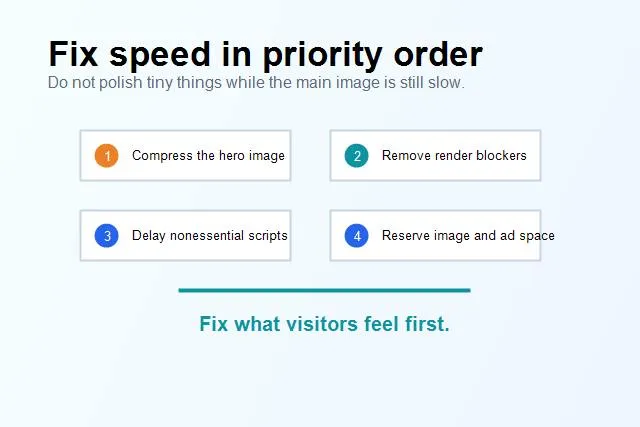
The fastest wins usually come from the visible page, not from chasing every tiny warning.
Also choose the right pages. Your homepage, service pages, pricing page, product pages, lead-generation pages, and high-impression blog posts usually deserve attention before old low-traffic posts. If you already have Search Console data, combine impressions with Core Web Vitals problems and work where the opportunity is real.
This connects naturally with your broader on-page SEO checklist. Speed is not separate from content quality, internal links, metadata, and technical health. A strong page gives visitors the answer quickly and makes the next step obvious.
Common Core Web Vitals mistakes
The first mistake is chasing a perfect score before fixing the obvious thing. A 100 score looks nice in a screenshot, but your business does not get paid in lab points. If the LCP image is too large, fix that before shaving tiny bytes from a footer icon.
The second mistake is testing only the homepage. Many sites have a polished homepage and slow templates underneath. Blog posts, category pages, product pages, and location pages often carry different images, scripts, embeds, or layout rules. Test the pages people actually land on from search.
The third mistake is optimizing desktop while mobile visitors suffer. In most SEO contexts, mobile matters more. A page that feels fine on office Wi-Fi can feel very different on a phone with a weaker connection.
The fourth mistake is treating speed as a one-time cleanup. New images, new plugins, new tracking tags, and new templates can bring the problem back. Add performance checks to your publishing routine, the same way you check titles, meta descriptions, headings, and broken links.
FAQ
What is a good Core Web Vitals score?
For practical purposes, aim for good status on LCP, INP, and CLS for your important pages. The exact thresholds can change over time, so use PageSpeed Insights and Search Console as your current reference. The goal is not perfection; it is a page that loads quickly, responds quickly, and stays visually stable.
Do Core Web Vitals directly improve rankings?
They are one part of page experience, not a replacement for relevance and helpful content. Better performance can support SEO, but it will not rescue a page that does not answer the search intent. Treat Core Web Vitals as a quality and conversion improvement that can also help search performance.
Should I fix every warning in Lighthouse?
No. Fix the warnings that connect to real user problems first. If the biggest issue is a slow hero image, start there. If the biggest issue is JavaScript blocking interaction, start there. A focused fix beats a scattered cleanup.
How often should I check Core Web Vitals?
Check important templates after major design, plugin, content, or tracking changes. For active sites, a monthly review is reasonable. For pages that drive leads or revenue, check after every meaningful change.
Final thought
Core Web Vitals are not there to make site owners feel guilty. They are a practical signal that says, "this page may be making people wait, miss clicks, or lose their place." Fix that, and you make the site easier for both visitors and search engines.
If you want a simple place to start, run your important pages through the SerpCue SEO audit tool, pick the highest-impact page, and fix one visible performance issue at a time. Small, clean improvements beat heroic overhauls that never ship.


