How to Check Your Website Ranking on Google
A practical guide to checking Google rankings with Search Console, rank tracking, and trend-based SEO decisions.

How do I check my website ranking on Google? Use Google Search Console for real search performance, a rank tracker for monitored keywords, and manual checks only as a quick spot check. Do not trust one private browser search as the final answer, because location, personalization, device, and search history can change what you see.
Rankings are useful, but only when you read them the right way. A single position number can make you feel brilliant before breakfast and doomed by lunch. The trend is what matters. The page, query, clicks, impressions, CTR, and movement over time tell the real story.
This guide shows you how to check website rankings without fooling yourself, and how to turn ranking data into action.
Table of contents
- What does website ranking mean?
- How do I check my website ranking on Google?
- Search Console vs rank tracker: which should you use?
- Which rankings should you track?
- What should you do with ranking data?
- What ranking mistakes should you avoid?
- FAQ
What does website ranking mean?
Your website ranking is where a page appears in Google's search results for a specific query. If your page appears third for "emergency plumber pricing," your average ranking for that query might be around position 3. If it appears on the second page, it might be around position 12 or 18.
But ranking is not one fixed number carved into stone by a very serious search wizard. It changes by country, city, device, language, search history, and the exact wording of the query. It can also change from day to day as Google tests results.
That is why you should track rankings as a trend, not as a daily emotional weather report. The useful question is not "what did I see in my browser once?" The useful question is "are the right pages becoming more visible for the right searches?"
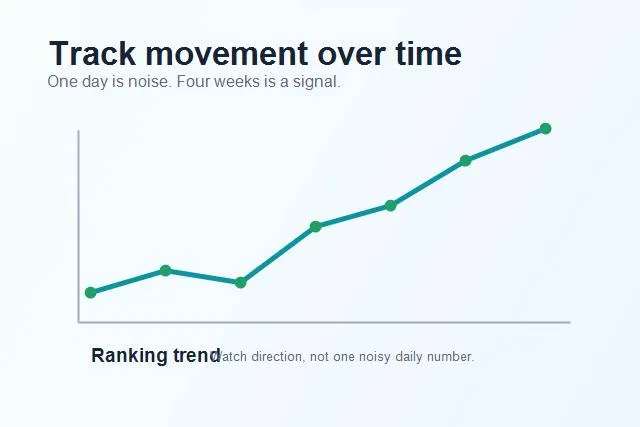
Rankings move around; the trend over time matters more than one daily snapshot.
How do I check my website ranking on Google?
There are three practical ways to check rankings: Google Search Console, a rank tracker, and manual spot checks. Each one has a job.
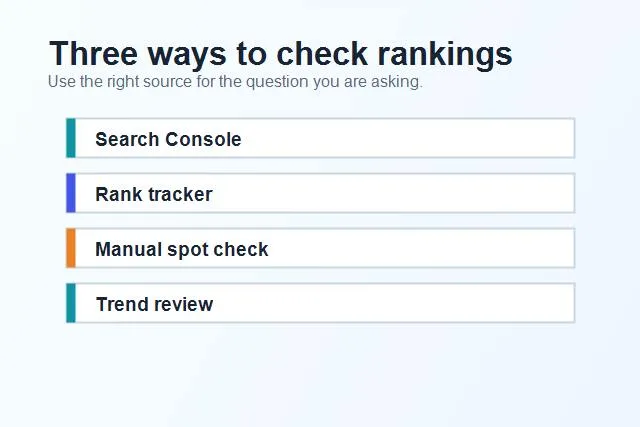
Each ranking check method answers a different question, so do not treat them as interchangeable.
Google Search Console shows the queries and pages that actually earned impressions and clicks. It is the best starting point because it uses real performance data. You can see average position, clicks, impressions, CTR, countries, devices, pages, and date ranges. The tradeoff is that average position is an average, not a precise daily rank.
A rank tracker monitors specific keywords over time. This is useful when you have target phrases you care about, such as service keywords, local terms, product queries, or important blog topics. SerpCue's keyword rank tracker is built for this kind of monitoring: clear movement, not spreadsheet archaeology.
Manual checks are fine for quick confirmation, but they are easy to misread. If you search your own keyword in a normal browser, Google may personalize the results. If you check from the wrong location or device, you may see something different from your customers. Use manual checks as a sanity check, not as your main reporting system.
Search Console vs rank tracker: which should you use?
Use Search Console when you want to discover what is already happening. It answers questions like: Which queries bring impressions? Which pages are gaining clicks? Which keywords are close to page one? Which pages have high impressions but low CTR?
Use a rank tracker when you already know the keywords you care about and want consistent monitoring. It answers questions like: Did this target keyword move up or down? Are we holding page one? Did a competitor overtake us? Which tracked keywords need attention this week?
The strongest setup uses both. Search Console finds opportunities. Rank tracking keeps an eye on the priority keywords. Together, they stop you from working blind.
If you are new to Search Console, start with the Google Search Console beginner guide. It explains the reports that actually matter, without making the interface feel like a cockpit during turbulence.
Which rankings should you track?
Do not track every phrase you can imagine. Track keywords that connect to real pages and real business goals. Otherwise, you create a dashboard that looks impressive and teaches you nothing.
Start with your core service or product keywords. These are the phrases your best customers might search before they contact you, buy, book, compare, or request a quote.
Then track important informational keywords that support those pages. If you have a guide that explains a problem your product solves, tracking that phrase helps you see whether the guide is gaining visibility.
Also track page-two opportunities. Keywords in positions 11-20 often have the clearest upside. Google already sees some relevance, but the page may need stronger content, better internal links, a cleaner title, or a better match for search intent. That idea connects directly to the page-two keywords guide.
Finally, track branded terms. Your brand keywords show whether people are searching for you by name and whether your own site controls the result.
What should you do with ranking data?
Ranking data is not the finish line. It is a signal that tells you what to do next.
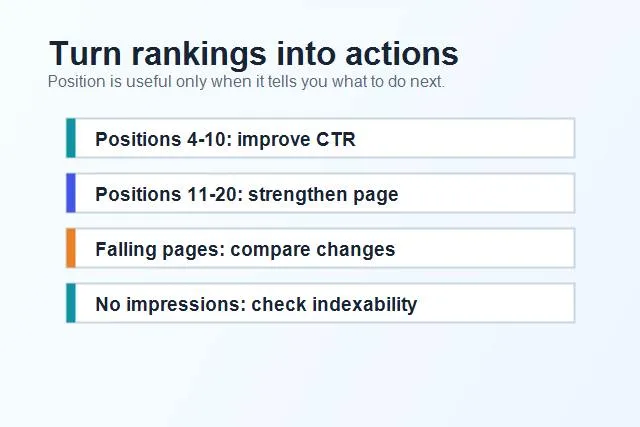
Ranking data becomes useful when it points to a concrete next action.
If a keyword ranks in positions 4-10 with strong impressions but weak CTR, improve the title tag and meta description. You are visible, but not earning enough clicks. A clearer title or stronger benefit can help.
If a keyword ranks in positions 11-20, improve the page itself. Add missing sections, answer the query faster, include examples, strengthen internal links, and compare the page against results already on page one. You are close enough that focused work can matter.
If a page is falling, check what changed. Did you edit the page? Did a competitor publish something better? Did search intent shift? Did technical issues appear? Ranking drops are clues, not verdicts.
If a page has no impressions at all, do not obsess over position. First check indexing, crawlability, internal links, and whether the page targets a real query. A page with no visibility may have a discovery or intent problem before it has a ranking problem.
This is where a Search Console SEO workflow helps. Raw data is nice. Prioritized actions are better.
What ranking mistakes should you avoid?
The first mistake is checking rankings from your own browser and treating that as truth. Your browser is not a neutral laboratory. It knows things. It has seen things. It may be biased toward your own site because you visit it often.
The second mistake is tracking rankings without tracking clicks and impressions. A position can improve while traffic stays flat if search volume is low. A position can drop while clicks rise if impressions increase. Context matters.
The third mistake is reacting too quickly. Rankings wiggle. If you rewrite a page every time it moves down one position, you may create more chaos than progress. Give meaningful changes time to settle.
The fourth mistake is tracking keywords that do not have a matching page. If you want to rank for a phrase, ask which page deserves to rank. If the answer is "none yet," you need a page strategy, not just a rank report.
The fifth mistake is ignoring intent. Ranking for a keyword is only valuable if the page satisfies what the searcher wanted. If people want a checklist and your page is a sales pitch, rankings will be harder to keep.
How often should you check rankings?
For most site owners, weekly ranking review is enough. Daily checking can be useful for active campaigns, but it can also turn into SEO doomscrolling with charts. Weekly gives you enough movement to spot trends without reacting to every tiny shake.
Use a 28-day or monthly view in Search Console when reviewing performance. Compare it with the previous period and look at both query-level and page-level changes.
When you make a major change, note the date. Then review the page after two, four, and eight weeks. That creates a clean learning loop.
FAQ
Can I check my Google ranking for free?
Yes. Google Search Console is free and shows average position for queries and pages that receive impressions. It is the best free starting point for real ranking data.
Why do rankings look different when I search manually?
Manual results can vary by location, device, personalization, search history, and result features. That is why manual checks should not be your only ranking source.
What is a good average position?
It depends on the keyword and page. Positions 1-3 usually earn the most clicks, positions 4-10 are visible but need strong titles, and positions 11-20 are often good improvement opportunities.
Should I track every keyword?
No. Track keywords connected to important pages, revenue, leads, or content strategy. Too many tracked keywords create noise.
Final thought
Checking rankings is useful when it helps you make better decisions. It is not useful when it becomes a daily ritual of refreshing, sighing, and blaming the moon.
Use Search Console to discover what is already happening, use a rank tracker to monitor priority keywords, and turn movement into action. If you want a cleaner way to do that, start with SerpCue's keyword rank tracker and focus on the pages that can actually move.


